Add Email Forwarding for your User under your Enterprise Email
Add Forwarding from your Admin Dashboard of your Enterprise Mail under your Control Panel
You can set a forwarding address for a user account if required. By doing so, a copy of all emails sent to that user would be sent to the forwarding address you specify.
Note: A copy of the email will be stored under the user's account as well.
To add mail forwards –
- Go to Mail >> Manage Users / Accounts in your control panel.
- Locate the account for which you wish to add forwards, and click on Edit.
- On the account details page, click on Add Forward(s).
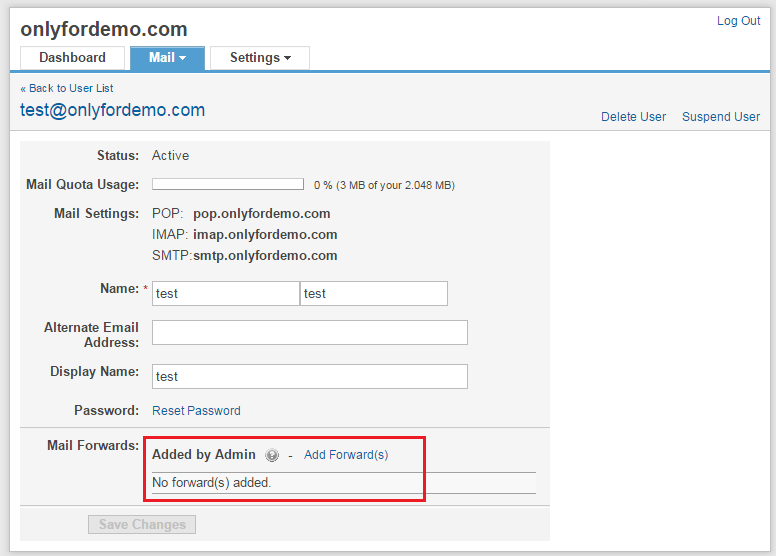
- Specify one or more email addresses to which you wish to copy this user's email, and click on Add.
Find the URL for more details: https://support.mailhostbox.com/adding-admin-mail-forwards-to-a-user-account/
Related Articles
Add Email Forwarding for your User under your Business Email
Add Forwarding from your Admin Dashboard of your Business Mail under your Control Panel You can set a forwarding address for a user account if required. By doing so, a copy of all emails sent to that user would be sent to the forwarding address you ...Add Auto Email Forwarding in your Gmail
Automatically forward Gmail messages to another account You can choose to forward all of your new messages to another email address, or only forward certain types of messages. Set up automatic forwarding You can automatically forward your messages ...Add User Account for your Business Email
Add a new Email User Account from your Business Mail Dashboard under Control Panel For your users to start using the email services, you first need to create accounts for them. Creating a user account is fairly simple – Go to Mail >> Add User in your ...Add New User Account from your Admin Console
Add a user account to your Admin console Tip: Try the Home page quick link. On your Admin console Home page, click Add a user, and go to step 5 below. First switch to an administrator account. This will open the Google Admin Console. From the Admin ...Email Client Configuration for your Google Email
Set up Gmail with a third-party email client Your users might want to send and receive mail from other email clients, for example Microsoft Outlook or Apple Mail. This article has steps for admins and users to set up Gmail with another mail client. ...